

Find the posts that stop at a reaction.
Output: one missing buyer question and a concrete next action to add.
The team publishes every week. At the quarter-end review, sales asks which accounts started an evaluation. The report shows impressions and reactions, but no account history.
- Open the last 10 posts and their replies. Start with your own Page or the author’s analytics.
- For each, write the reader’s likely next question and the action the post actually offers.
- If a post names a problem but offers no checklist, explanation or relevant proof, record that missing resource. A low reaction count alone does not establish failure.
Worked case: a sales-versus-marketing joke gets a relevant reader’s attention. Their next question may be “How do we review the missed handover?” Link to that review, then check whether anyone uses it. Treat the question as a hypothesis until replies or buyer records support it.
LinkedIn can help an enterprise buyer find your company, understand the problem and request a meeting. That takes content for each decision, plus a record of what the buyer did next.
We analyzed 19,000+ pieces of B2B LinkedIn content. This guide shows how to research, create, distribute and measure one campaign. Read the research note.
The post earns a response. Check what the reader asks next.
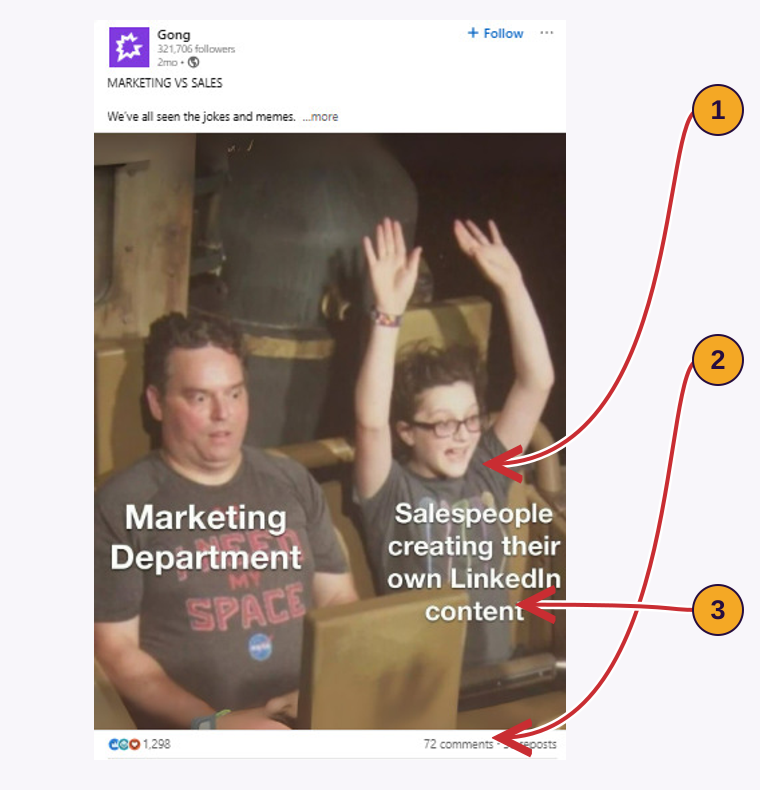
- 1
A familiar problem
Gong shows tension between sales and marketing. The post can start a conversation.
Apply it: Follow with the checklist when the reader asks how to inspect a slipped deal.
- 2
A reaction count
Reactions show a public response, not an accepted sales opportunity.
Apply it: Record the account’s question separately from the reaction count.
- 3
The next piece
Recognition leaves the cause unanswered.
Apply it: Publish the deal-review checklist next.
A product tour answers a different question from a checklist.
Use the checklist when someone asks why a deal slipped. Use the product tour when they ask how your software helps review that deal.
Show the task the buyer will inspect.
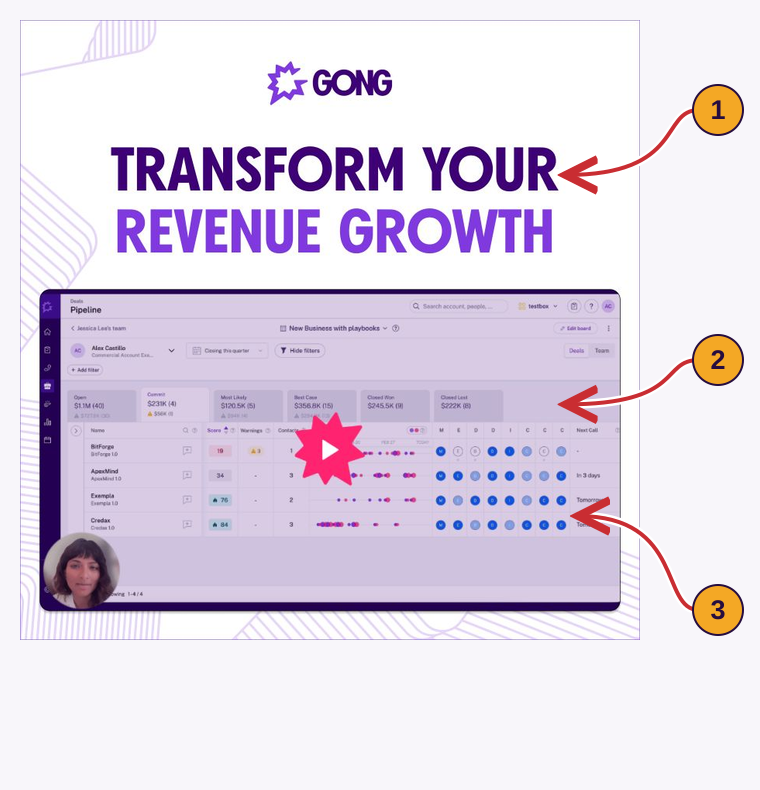
- 1
The headline
The broad promise leaves the task unclear.
Apply it: Name it: review changes to one deal before the forecast call.
- 2
The product screen
The interface shows what the product looks like.
Apply it: Show the field or action that helps answer the named question.
- 3
The next action
A tour helps someone checking product fit.
Apply it: Link early readers to the checklist; offer evaluators the verified walkthrough.
| What the team is doing | Why the spending decision is weak | What to change |
|---|---|---|
| Choosing ads by likes alone | Likes do not identify the buyer or the next decision. | Compare the three posts in the completed selection sheet. |
| Asking for a demo in every post | Early readers have no way to inspect the problem. | Give them the six-page deal checklist first. |
| Copying one caption across employee profiles | Each post repeats the same information. | Use the Page and expert examples. |
| Adding a country name to a global post | The post still ignores the reader’s responsibilities. | Compare the regional and country-team versions. |
| Stopping after the first meeting | Colleagues who missed it lack the evaluation details. | Send the one-page decision brief. |
Before paying for reach, check that the post answers the buyer’s question and offers a useful next step. Then test whether it helps the selected audience.
Plan the missing checklist, comparison, proof and decision brief around one question. Continue ↓
Choose the next question your buyer needs answered.
Output: five connected pieces, each with a different job.
Use this buying question throughout: “Why did a forecasted deal slip?” The example vendor sells revenue-intelligence software to enterprise sales and operations teams.
Each piece below names the question, format and next action.
Buyers can enter at any stage. A finance colleague may first see the decision brief; a sales operations leader may start with the checklist.
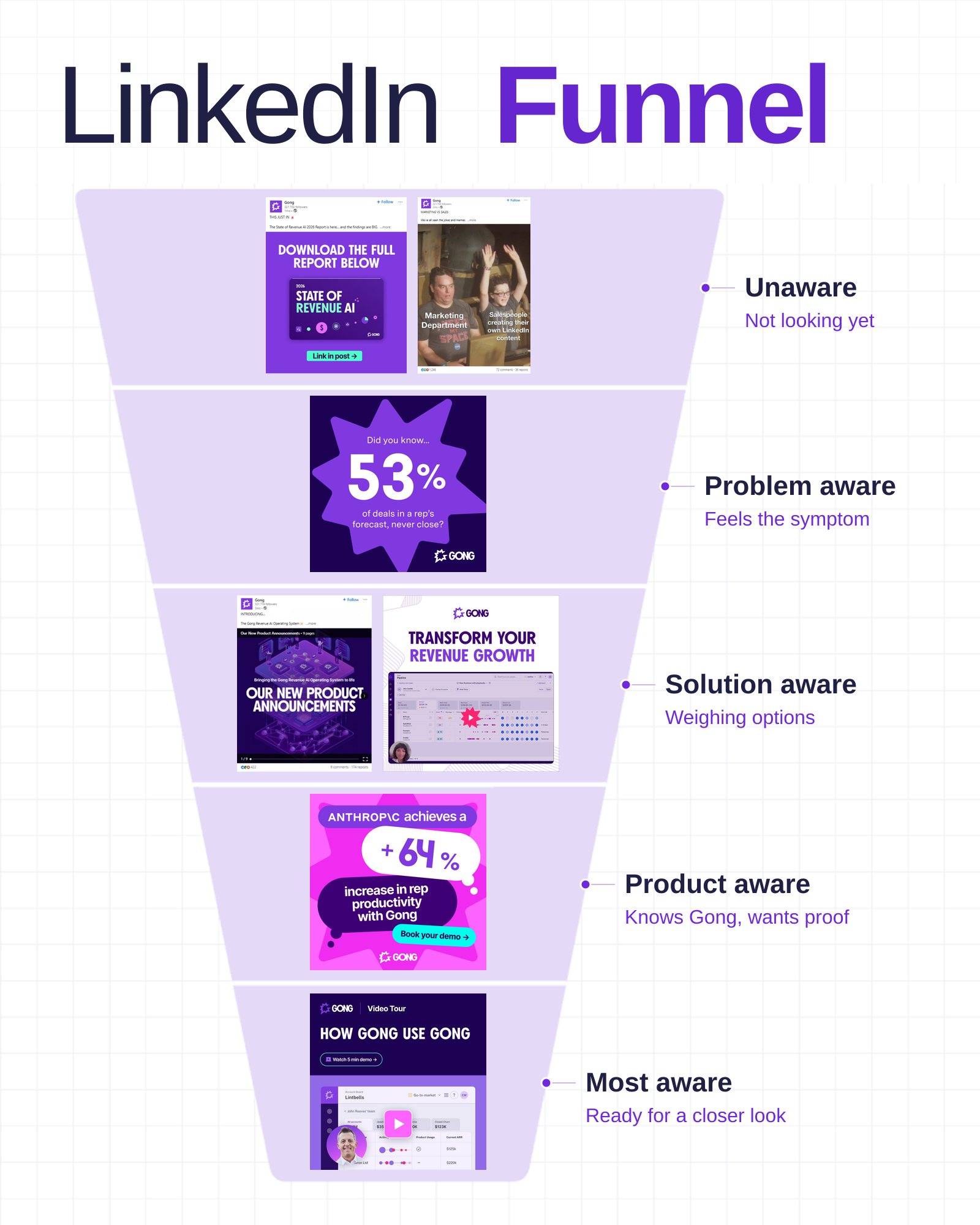
What the buyer needs next determines what you create.
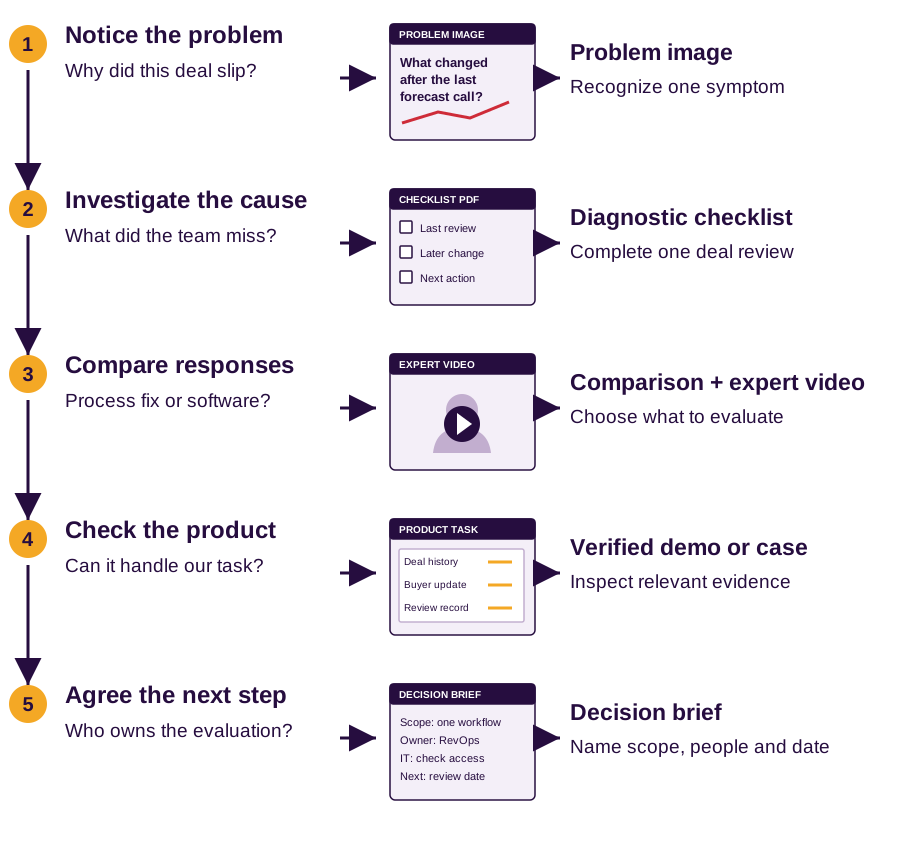
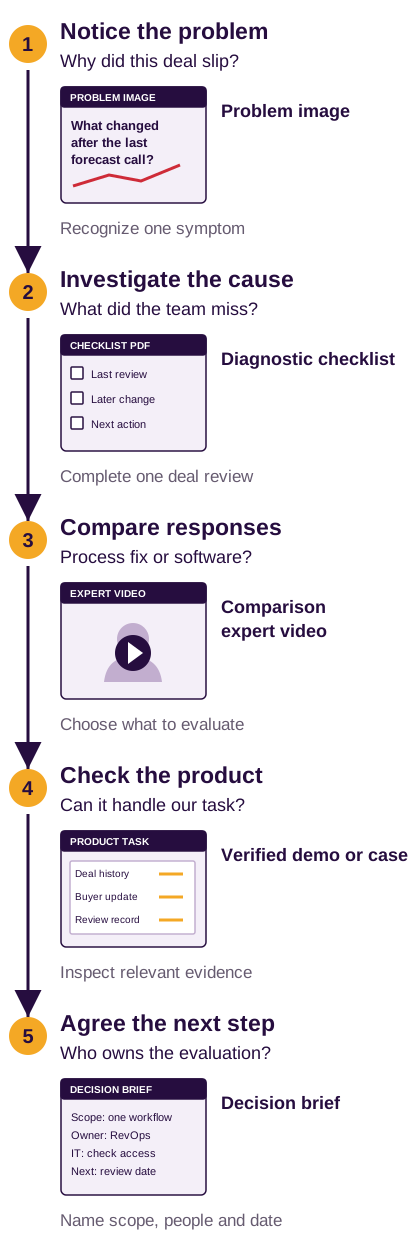
Use the five buyer questions to guide the research. Find the posts, evidence and tools ↓
Find relevant posts, inspect the evidence and write the brief.
Output: a source sheet, a format test and one expert-approved content brief.
Use one question throughout this walkthrough: why did a forecasted enterprise deal slip? The marketer builds the campaign. The intended readers are sales operations and revenue leaders who own that review.
Combine what competitors publish with what your buyers need.
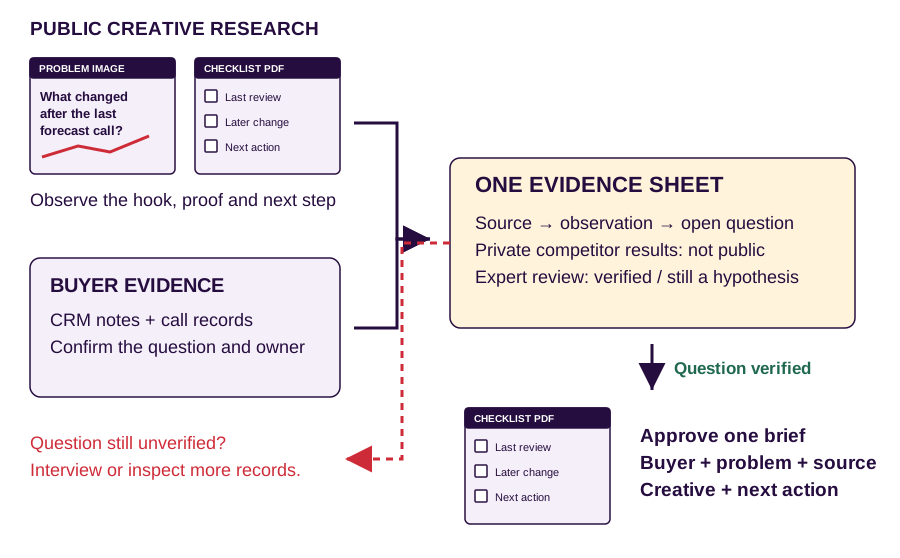
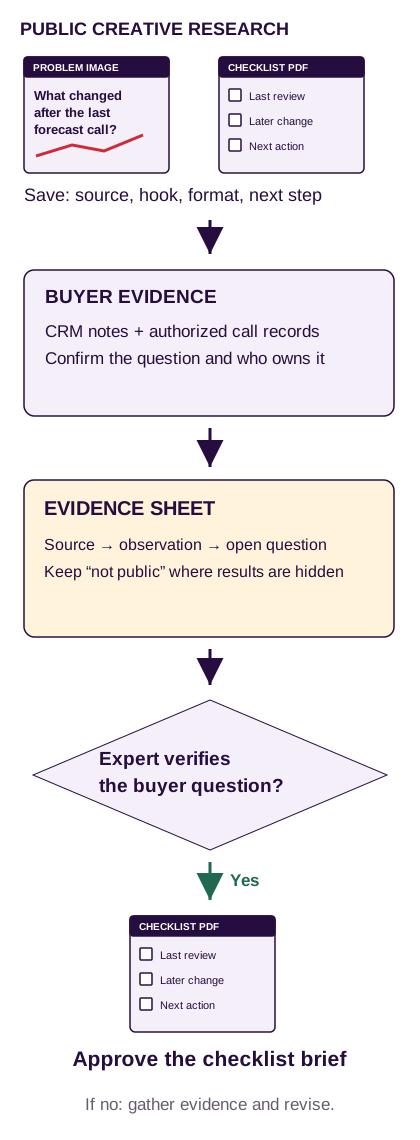
Start with the tools you already have.
| Job | Start here | Add only if needed | Save this output |
|---|---|---|---|
| Find organic posts | LinkedIn search, company Pages and expert profiles | Taplio for keyword and format discovery | Original post links and screenshots |
| Compare competitors | Page admin → Analytics → Competitors | Socialinsider for a repeatable comparison project | Same-period comparisons with metric definitions |
| Find paid creatives | LinkedIn Ad Library | No extra tool needed for this first audit | Creative, offer, format and landing-page link |
| Verify buyers and questions | CRM, authorized call records, LinkedIn profiles | Sales Navigator for account and role filters | Role, task, evidence and unresolved question |
| Store and brief | Google Sheets or Excel + a shared document | Your approved source notebook | Source sheet and a checked creative brief |
Buy a discovery or comparison tool when it removes a recurring manual task. You do not need both Taplio and Socialinsider to run this first campaign. Sales Navigator finds accounts and people; it is not a creative-performance database.
3A. Choose the accounts, experts and question.
- Choose three direct competitors and three relevant practitioners. Pick firms serving the same buyer and use case. For the worked example, Gong provides public creative references. Check other vendors’ current positioning before adding them to the comparison.
- Set one review window. Start with the latest 90 days where available. Use the same period for comparisons. Keep older references in a separate tab, such as the historical Gong creative below.
- Read five recent call records and five delayed opportunities. This is a starting batch, not a statistical sample. Record the buyer’s actual question, role, timestamp and unresolved decision. If you lack recordings, interview customers or practitioners.
"forecast accuracy""deal slipped""sales forecast"Read the author’s role, the post and the replies. A useful reference addresses the review task, shows evidence or attracts a substantive question from a relevant role. A popular career post does not become relevant because a sales leader liked it.
If LinkedIn search misses a post
site:linkedin.com/posts/ "forecast accuracy" "Gong"Use a search engine to locate an indexed original. Coverage is incomplete. Save the original LinkedIn URL and capture date; do not treat search rank as post performance.
3B. Find organic creative references in Taplio.
Taplio: start with the buyer’s task, then narrow the results.
- Open Viral Posts → Explore more.
- Search why forecasted deals slip.
- Use Published on for your review period and Content for images or carousels.
- Use Creator to inspect a chosen author. Sort by comments to find discussion candidates.
- Open each original. Save relevant examples to Saved posts and your source sheet.
A first batch of 15 relevant references across your competitors and practitioners. Record duplicates once. The number is a manageable workload, not a research benchmark.
Keep: a buyer task, inspectable evidence or a specific question in the replies.
Exclude: generic motivation, unrelated B2C topics and posts whose only attraction is a high like count.
Taplio documents these filters. Its library is not the whole LinkedIn feed. Its “why viral” explanation is a hypothesis to inspect, not proof of algorithmic causation. [21]
3C. Compare what competitors publish.
For a quick check, use your Page’s Analytics → Competitors. LinkedIn’s available comparisons depend on the Page plan; its trending-post view covers the past 30 days. Keep that view separate from the 90-day research batch. For a recurring audit, add your Page and chosen competitors to one Socialinsider project, open Benchmarks → LinkedIn, select comparable profiles and a common period, then export the comparison. [23] [22]
Inspect the top posts, then open the original.
The format mix shows what they publish, not what caused a result.
Group the saved posts by the question they answer.
Useful: “In our saved examples, three posts explain how to inspect a deal. We will test a checklist on that question.”
Unsupported: “Our competitor’s carousels generate the most pipeline.” You cannot see their private attribution.
When you report an engagement rate, write its formula beside it. LinkedIn Page engagement includes clicks; a tool’s follower-based rate uses a different denominator. Compare like with like. [27]
3D. Inspect paid offers in LinkedIn Ad Library.
LinkedIn Ad Library: search the advertiser, then the market.
- Search the advertiser. Start with Gong. If results are missing, check the exact brand or parent-company name and remove leftover filters.
- Apply the market and date. Check Singapore, then Malaysia separately. The country filter concerns ad delivery, not the advertiser’s headquarters. If you find no local example, label a global reference as global.
- Inspect the offer. Open View details. Save the image, opening line, promised resource, call to action, format and destination. Use a keyword such as forecast to narrow a large result set.
- Record the limits. Spend, clicks, leads and pipeline are not public here. EU-targeted ads may expose extra impression and targeting information. A repeated creative or long run is not proof of profitability.
A result is a creative to inspect, not a proven winning ad.
Gong uses different offers for different questions.
The interface examples above come from their named publishers because LinkedIn blocked direct access in this research browser. They illustrate the controls and creatives. They do not represent a newly verified Gong campaign, local delivery or account performance. Use LinkedIn’s current help for feature scope. [24]
3E. Choose a format to test. Do not promise an algorithm result.
LinkedIn describes a personalized feed that uses relevance and member context. It also acts against recycled engagement bait and artificial engagement. A format can perform differently for a company Page, a personal profile and a particular buyer group. [15] [28]
Use a benchmark to choose a test, then check your audience.
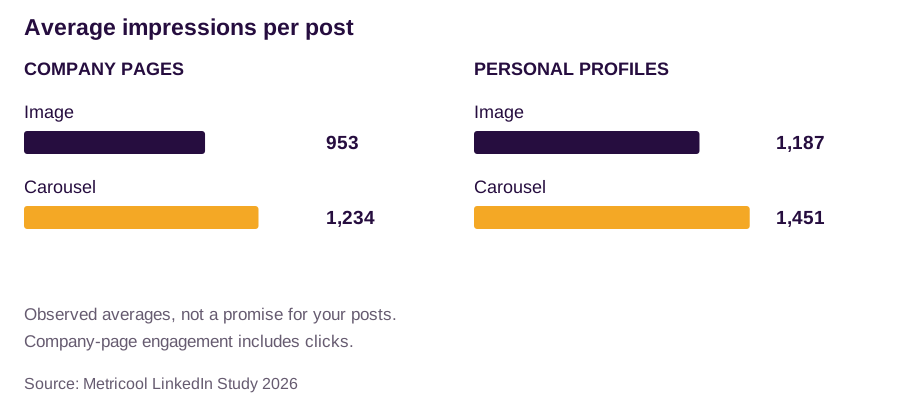
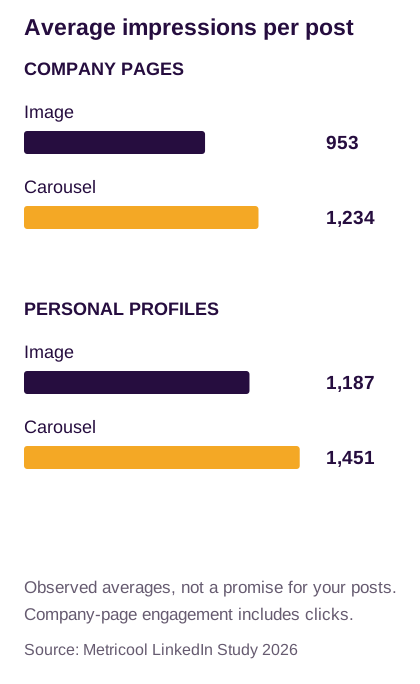
Publish an image explaining one missing update and a document showing the review steps. Keep the buyer question, publisher, destination and measurement window consistent.
Repeat across several comparable questions before setting a standing format rule. This is a practical comparison, not a randomized experiment.
Export Page content analytics or the author’s post analytics. Record impressions, substantive target-role replies, worksheet visits and agreed next actions separately.
Use the same seven-day window for each post. For personal profiles, use the author’s own analytics export; public competitor views do not supply those private metrics. [27] [30]
3F. Turn a saved post into a brief the designer can use.
Here is a completed source record using the historical Gong forecast creative shown in the production section. It supplies a problem-framing example, not a verified result for our campaign.
- Original
- Gong forecast-problem post · historical reference, outside the current comparison batch
- Observed creative
- Single image about forecasted deals that do not close; numerical claim; demo invitation
- Access date
- 20 November 2026
- Audience fit
- Relevant to forecasting work; confirm which operations or revenue role owns the task
- Cannot verify here
- Claim methodology, organic impressions, local delivery, qualified meetings or attributed pipeline
- What to borrow
- A specific operating problem followed by a clear action
- What to create
- “What changed after the last forecast call?” image, followed by a checklist comparing dated records
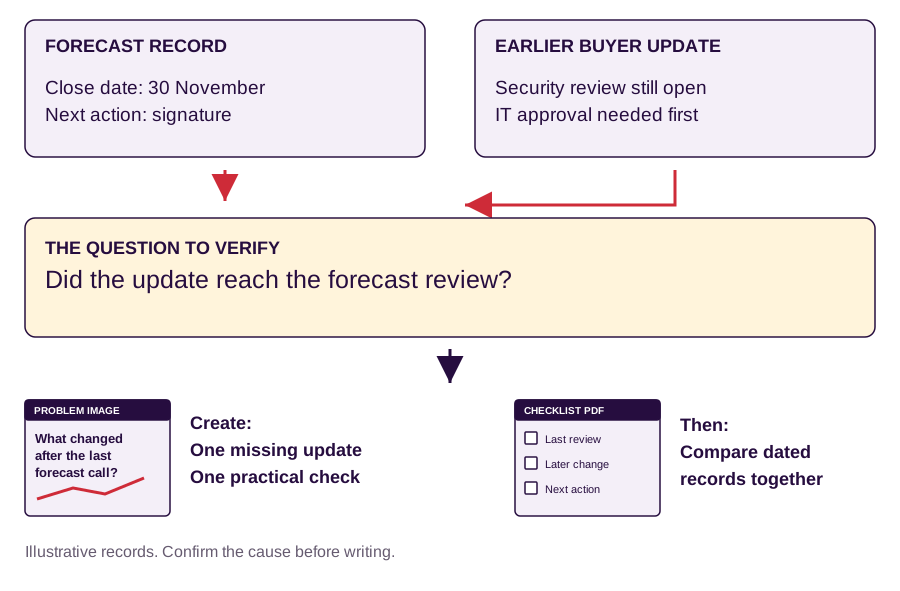
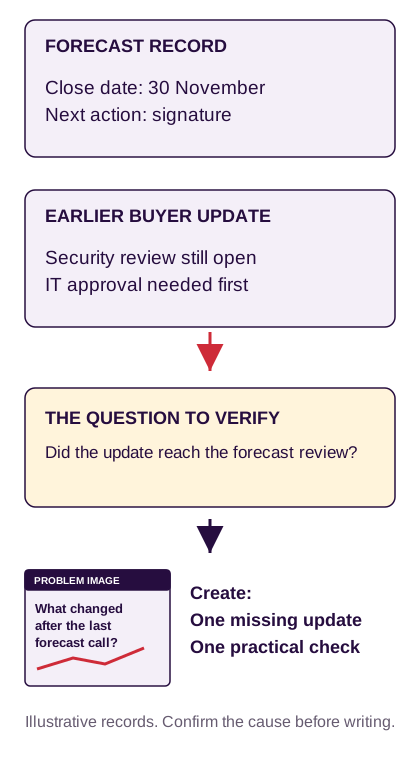
Show the records that lead to the creative.
- Reader and task
- Enterprise sales operations leader reviewing a slipped deal
- Question
- Did the team receive the buyer’s update before the forecast call?
- Opening image
- Put the dated forecast record beside the earlier buyer update. Highlight the missing security review.
- Follow-up resource
- A six-page checklist: baseline, change, cause, owner and next action
- Evidence owner
- The sales operations expert verifies the records and diagnostic before publication
- Next action
- Complete one deal review with the seller; request a workflow demonstration only if the review identifies a product-relevant gap
You now have a question, its evidence and a design brief. Create the image, checklist, video, proof and decision brief ↓
Turn the approved question into five usable pieces.
Output: an image, checklist, comparison video, proof asset and decision brief.
Start with the deal that slipped.
Gong’s creative names the problem. The annotations show what to borrow and what needs a source.
Name the problem before offering the product.
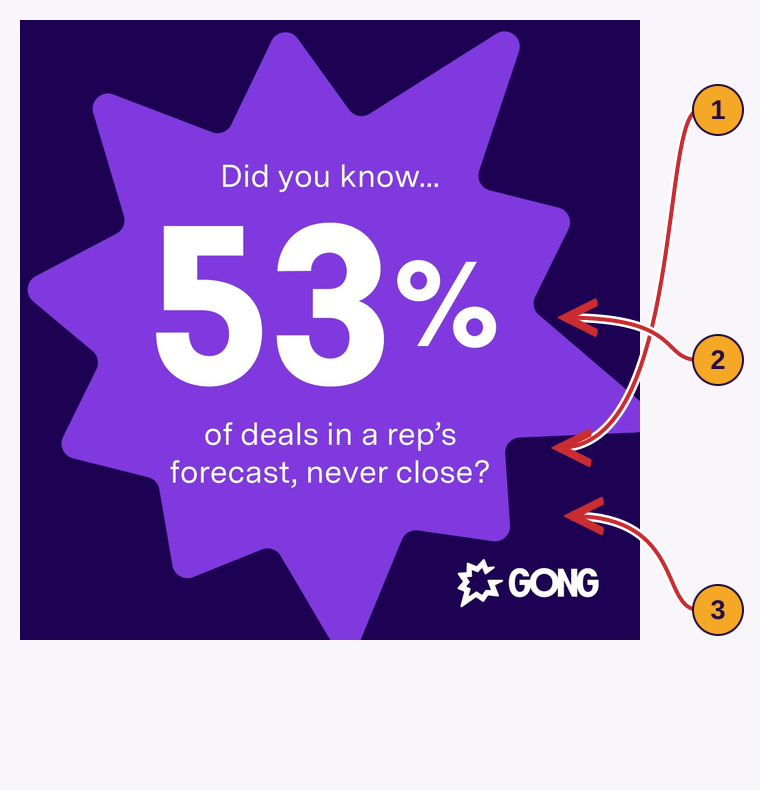
- 1
The problem
Gong names forecasted deals that never close.
Apply it: Keep the problem image about one slipped deal and what changed.
- 2
The percentage
Gong publishes 53%. This image does not show the study method.
Apply it: Without your own verified figure, use the question without a percentage.
- 3
The checklist
The reader still needs to find the cause.
Apply it: Use the checklist to check missing information, stage rules and changed buyer decisions.
Make the problem image in Canva or your existing design tool: use one headline and a simple diagram. A 1080 × 1350 canvas is one production option. Show real product screens only when they support the claim. [9]
What changed after the last forecast call?
Review one slipped deal with the seller. Then complete the checklist.
Show the six checks in order.
Draft in a document, get the expert’s review, then design six equal-sized pages. Export a PDF, upload it to LinkedIn and check every page on a phone.
All six pages of the diagnostic carousel.
Proposed example. Replace sample details with verified records.
Compare the forecast record with the earlier buyer update.
Expected close: 30 November.
Next action: signature.
Security review remains open.
The IT owner must finish it before signature.
The team had the update before the forecast call, but the forecast record omitted it.
The seller corrects the record and confirms the security-review owner and date. Check why the update failed to reach the review before choosing software.
Show which response fits each cause.
Record the four scenes below with your existing recorder. Edit and caption in Descript if useful; ask the expert to approve the final video. [8]
Comparison video: choose the response that fits the diagnosis.
Proposed example. Replace sample details with verified records.
Different stage definitions
First response: agree the evidence required to move a deal into each stage.
Do not assume: a new tool will make teams use the same definitions.
Evidence is hard to find
First response: map where relevant buyer information lives and who needs it.
Do not assume: a vendor supports your sources until you test it.
The buyer’s decision changed
First response: record the event, its date and its effect on the next action.
Do not assume: software can prevent every change in the buyer’s plans.
Comparison video: a 60-second expert video, shot by shot.
Proposed example. Replace sample details with verified records.
Why did this deal slip?
“Before choosing a forecasting tool, review one deal that slipped.”
Stage definitions differ → agree the rule
“If the team uses different stage definitions, agree the definitions first.”
Evidence exists → find and review it
“If managers cannot find the buyer’s update, check where the team stores it and who can access it.”
Complete the worksheet together
“If the buyer’s decision changed, record the change. Complete the worksheet, then decide which gap needs a product evaluation.”
Give the evaluator a claim they can check.
Gong’s customer creative names Anthropic and a productivity result. The case behind the number must explain how Gong measured it.
Show the customer, result and supporting case.
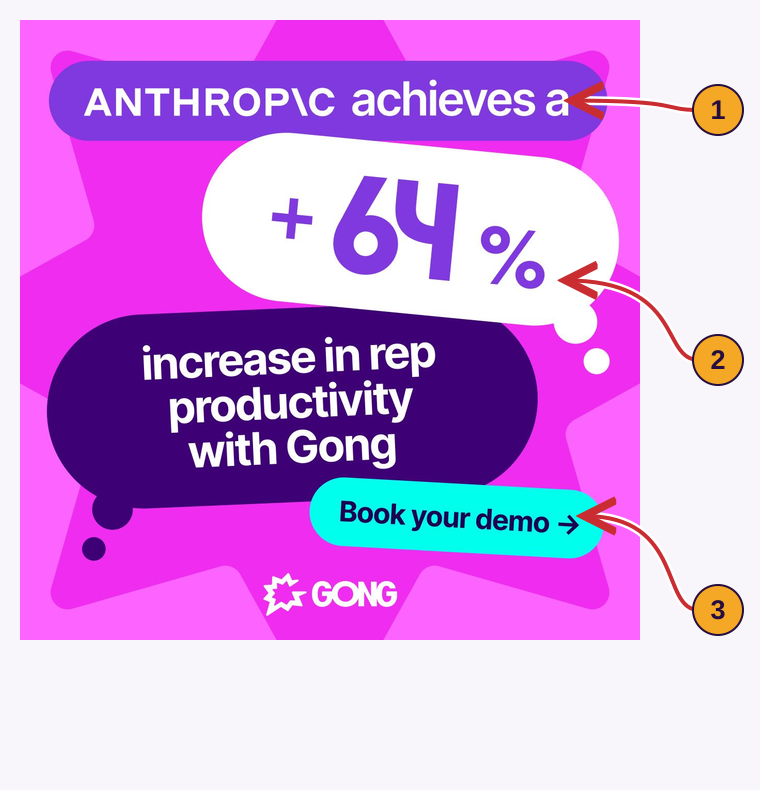
- 1
The customer
Gong names the customer behind the claim.
Apply it: Use an approved customer and explain the relevant operating conditions.
- 2
The outcome
The +64% claim needs a metric definition, baseline and period.
Apply it: Put those details in the case; do not promise the same result elsewhere.
- 3
The invitation
The creative offers a demo.
Apply it: Let the buyer inspect the proof and the matching workflow.
Prepare the demo or customer case: collect customer approval, baseline, metric definition, measurement period and limits. If you lack an approved result, show a verified product task using clearly labeled demo data.
Help the buyer explain the evaluation to colleagues.
State what the tour covers and its actual duration. After the meeting, record the agreed scope, owners and open questions in the decision brief.
Tell the buyer what the tour covers.
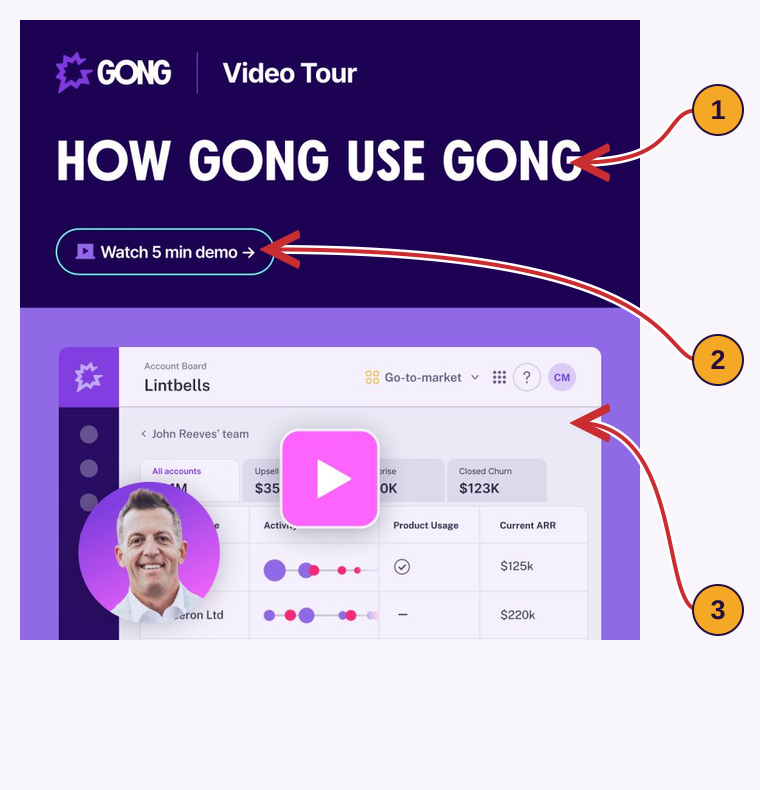
- 1
The subject
The tour covers Gong’s own use of its product.
Apply it: Name the task your tour demonstrates.
- 2
The duration
The invitation states five minutes.
Apply it: State the actual length and show what you promised.
- 3
The next meeting
The interface does not answer every implementation question.
Apply it: Use Decision brief to agree data access, owners and next actions.
Keep the same question connected before and after the meeting.
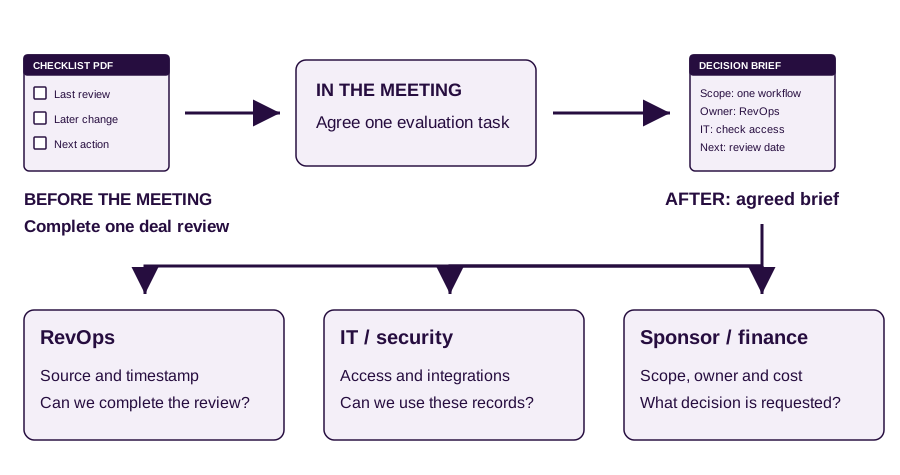
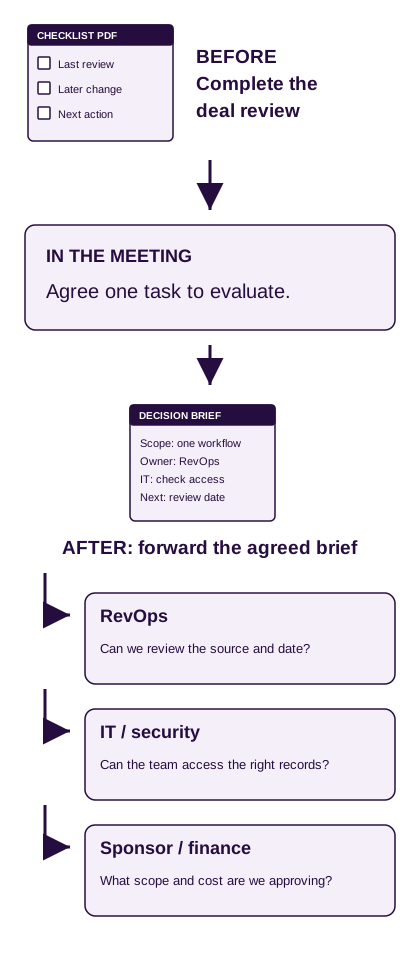
Decision brief: the brief a champion can forward after the meeting.
Proposed example. Replace sample details with verified records.
Forecast-review workflow
Approve a small evaluation of how the team brings evidence into the forecast review.
Problem to verify
Check whether managers received the deal changes before the review.
Proposed scope
Two teams; six slipped deals; two weeks. Proposed scope for this example.
People required
Revenue operations leads; the CRM administrator checks access; the sales sponsor approves the next step.
Evidence required
Dated stage history, close-date changes, buyer actions and the source of each change. Use authorized records only.
Comparison
Compare the current manual review with the proposed workflow on the same records and the same task.
Acceptance check
Check whether the reviewer can find the source, timestamp and next action. Mark missing items.
Open questions
Supported integrations, access controls, retention, implementation responsibility and cost. Confirm with the vendor.
Next action
Operations and IT agree the records, owners and review date before an evaluation begins.
Assign the approved pieces to a publisher, a date and someone who can answer questions. Continue ↓
Give each piece a publisher and a destination.
Output: a two-week schedule with channel, owner and response plan.
The Page publishes the checklist. The expert explains one judgment inside it. Here is how the two posts can use the same resource without repeating the caption.
Publish the checklist on the Page and explain one check through the expert.
Proposed example. Replace sample details with verified records.
Audit one slipped deal.
Last review → what changed → next action
Choose one deal that moved beyond its expected close date. This six-page checklist helps the seller and operations owner compare what they knew at the last review with what changed later.
Next step: complete the checklist together. Use the article’s worksheet to record the answers.
Did the buyer change the plan, or did the team miss the update?
Explain the difference in one minute.
A new buyer decision and a missed update need different responses. Compare the dated record from the last review with the later change. Then check when the team learned about it.
Next step: use page three of the checklist for that check. The video shows what to look for.
Add a partner, newsletter or direct share when it fits the question.
Partner or community
Offer: a 20-minute review of one anonymized slipped-deal worksheet with their practitioner.
Before producing: confirm the audience and editorial terms. Record sponsored placements as paid.
Opted-in newsletter
Subject: Review one deal before the next forecast call.
Content: one check from the checklist, then the tagged worksheet link. Use your existing sender, such as Resend. [11]
After a relevant meeting
Suggested note: You raised the timing of deal updates. Page three covers that check; the decision brief lists the records needed for the review.
Record this as sales-assisted sharing, not organic feed reach.
Distribute one resource through distinct contributions.
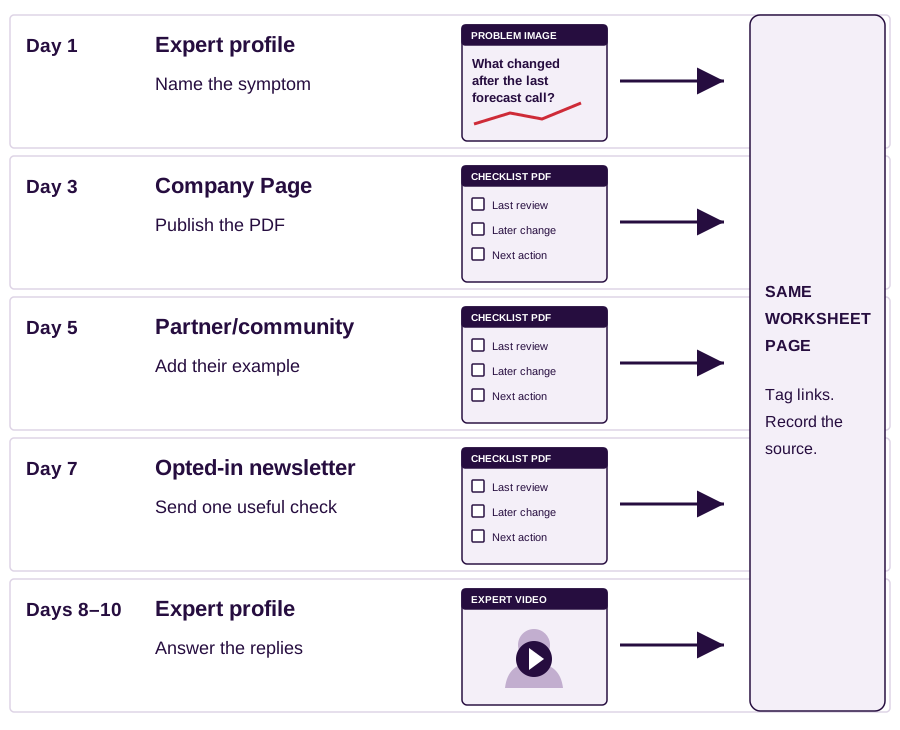
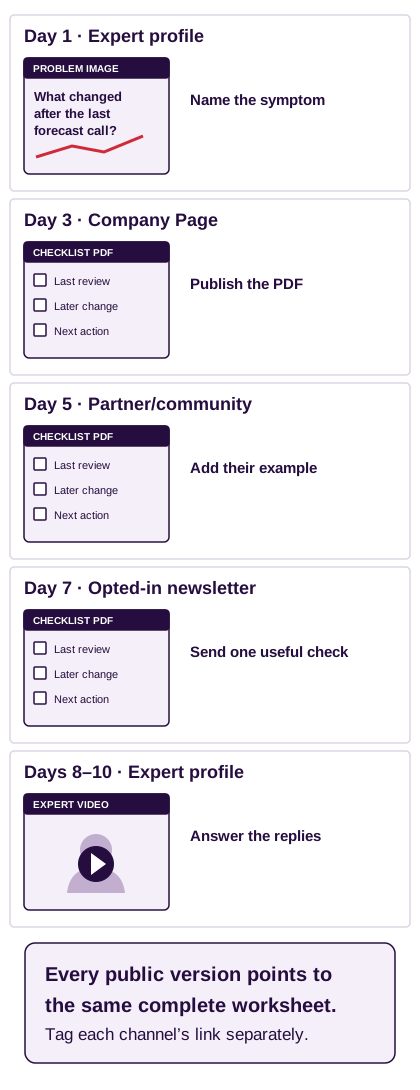
Schedule in LinkedIn; add Buffer only if coordination becomes difficult. Give each post the same measurement window and choose times when the author can respond. [10]
Ask colleagues to add an example or answer a question they know. Avoid scripted praise and reciprocal reactions; LinkedIn acts against engagement pods and automated comments. [15]
Before scheduling the regional posts, check which review the reader owns. Continue ↓
Show the local task the reader actually owns.
Output: regional versions grounded in verified responsibilities.
Check who owns the review. A regional leader may compare country teams; a country leader may inspect one deal. Validate that responsibility before choosing either version below.
One campaign, two role-specific regional executions.
Proposed example. Replace sample details with verified records.
Do both country teams mean the same thing by “commit”?
Compare the evidence behind the stage before comparing the forecast.
Take one deal from each country team. Record the evidence required to place it in the committed forecast. If the rules differ, agree the definitions before treating the totals as comparable. This worksheet helps operations and sales review the differences together.
Next action: use the checklist with the two team owners.
What changed after the last forecast call?
Review the date, decision participants and next buyer action for one slipped deal.
Choose a deal that slipped after the last review. What information changed, when did the team learn it, and where was it recorded? Use the worksheet with the seller and sales operations owner to distinguish a missing check from a changed buyer decision.
Next action: complete one deal review with the checklist.
Four checks before calling content “regional.”
| Check | Do this for the example |
|---|---|
| Evidence | Save the actual account interview or source supporting the forecast question. |
| Responsibility | Confirm who owns the regional review, country review and budget. |
| Wording | Ask the reader or local reviewer whether they use “commit” and what it means. |
| Publisher | Ask a relevant local practitioner to explain the check to their audience. |
For this campaign, inspect relevant SGTech event agendas and speaker roles before approaching a contributor. For a manufacturing campaign, FMM or MIDA may be better research sources. A listing or announcement alone does not establish demand. [16] [17] [18]
Change the language and reference
The campaign used local-language subtitles and local customer references: Tottenham Hotspur in the UK and Decathlon in France. [3]
Apply: ask your local expert to review the captions and select an approved case with relevant operating conditions.
Test locally specific wording
LinkedIn reports doubled engagement for a local ad line versus the version without it in the eight-week Q4 2023 campaign. [4]
Limit: this historical midmarket campaign does not forecast enterprise sales results. Test your own wording.
Publish the approved regional version, record the response and compare it with similar posts before paying for reach. Continue ↓
Promote a relevant response with a capped test.
Output: an ad brief with evidence, audience, spending limit and review date.
Dreamdata selected employee videos using organic engagement, sponsored them to marketers at named accounts and retargeted website visitors. The published case shows the sequence below. [1]
Sponsor the expert’s post with their permission.
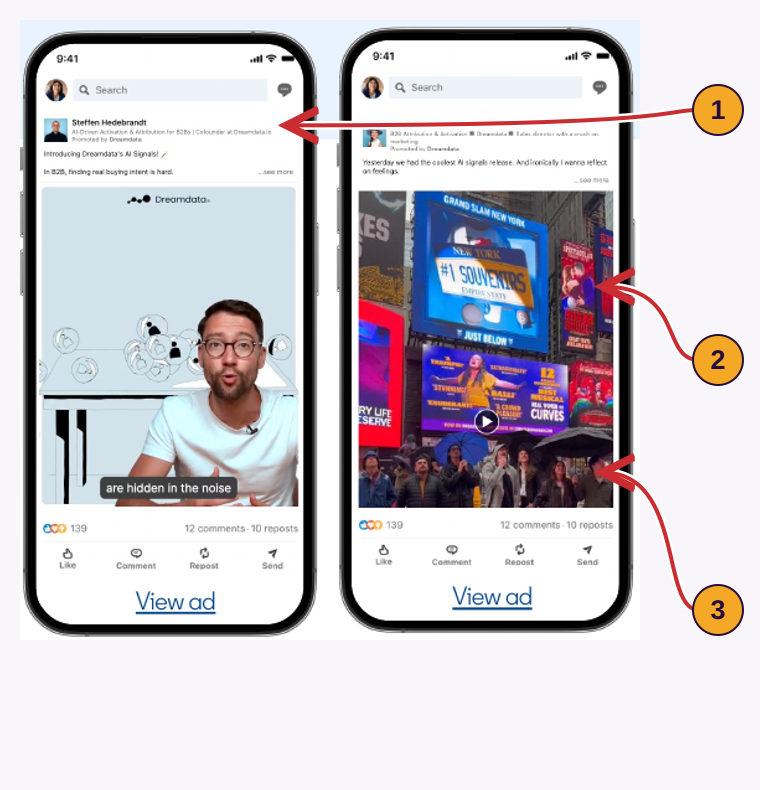
- 1
The author
The ad retains the employee’s identity.
Apply it: Obtain the author’s permission before sponsoring their post.
- 2
The selection
The case says Dreamdata selected videos using organic engagement.
Apply it: Save your organic results and compare relevant responses before spending.
- 3
The audience
The case describes targeting marketers at named accounts.
Apply it: Set account and role criteria in Campaign Manager; check the matched audience.
LinkedIn reports this engagement-rate comparison for employee-led versus brand-led ads. It also reports that Thought Leader Ads influenced 83% of closed-won deals. “Influenced” is not the same as “generated entirely by LinkedIn.”[1]
Its program combined expert content, paid amplification and downstream retargeting. LinkedIn reports 5.9 million impressions and 22% lower cost per lead than standard brand campaigns among exposed audiences.[2]
LinkedIn reports these case results. The stories do not disclose all spend, attribution or experimental details. Copy the workflow as a test, not the percentages as a forecast.
Choose a candidate using the same checks.
Compare similar posts from the same author or Page over the same period. Record raw counts and rates. In the example below, the diagnostic earns more relevant replies per 1,000 impressions, despite lower reach.
A completed selection sheet: which post deserves a test?
Proposed example. Replace sample details with verified records.
“Grow revenue faster”
- Impressions
- 20,000
- Relevant target-role replies
- 2
- Saves
- 10
- Replies / 1,000 impressions
- 0.1
- Saves / 1,000 impressions
- 0.5
Do not choose it merely because reach is larger.
“Audit one slipped deal”
- Impressions
- 4,000
- Relevant target-role replies
- 8
- Saves
- 16
- Replies / 1,000 impressions
- 2.0
- Saves / 1,000 impressions
- 4.0
Candidate for a small paid test, subject to audience and claim checks.
“See our platform”
- Impressions
- 1,500
- Relevant target-role replies
- 0
- Saves
- 3
- Replies / 1,000 impressions
- 0.0
- Saves / 1,000 impressions
- 2.0
Too little evidence to call a winner or a failure.
Version B will produce relevant worksheet use among the selected accounts.
Organic results, paid results and CRM opportunity progression.
Wrong audience, broken tracking, unsupported claim or cap reached without the agreed useful action.
Fill the test brief before opening the campaign.
Use the organic evidence to decide what earns a paid test.
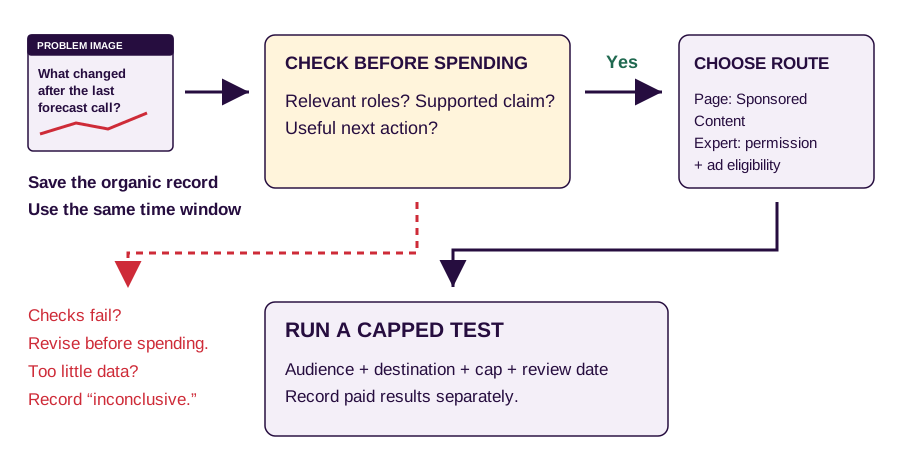
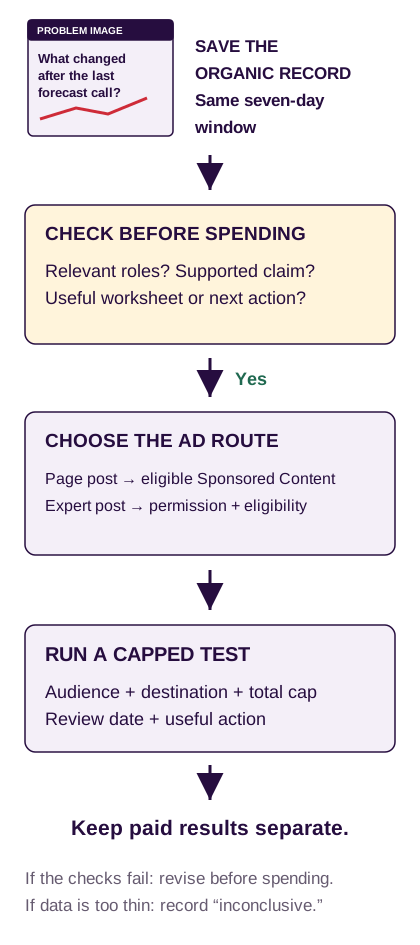
A filled brief for the first paid test.
Proposed example. Replace sample details with verified records.
Problem image, version B
- Tool
- LinkedIn analytics + spreadsheet
- Example baseline
- 7 days · 4,000 impressions · 8 relevant replies · 16 saves
- Action
- Save the post URL, date and available audience data before sponsorship.
Company Page asset
- Tool
- Campaign Manager
- This example
- Single-image Sponsored Content
- If using an expert’s post
- Use an eligible Thought Leader Ad and obtain the author’s permission. Check format and objective in the account.
Named accounts and roles
- Proposed filters
- Validated enterprise account list · Singapore / Malaysia · relevant sales operations roles
- Before launch
- Check company matches and estimated audience size. A Sales Navigator list does not automatically become an ad audience.
Checklist worksheet page
- Useful action
- The buyer opens the worksheet and asks a relevant review question.
- Tracking
- Use a tagged link and test the destination. Record visits and conversations separately.
- Example link label
utm_content=f01_b_paid
Write the cap and review date
- Illustrative plan
- US$1,000 total · 14 days · one audience
- Before approval
- Check account minimums and delivery forecast. This budget does not guarantee enough data.
- Owner
- Campaign lead reviews spend and response quality.
Inspect the actual response
- Wrong roles
- Fix targeting.
- Right roles, broken next step
- Fix the creative or worksheet page.
- Tracking broken or cap reached
- Pause. Call a small sample inconclusive; do not label clicks as opportunities.
Show product proof after the diagnostic, when the audience qualifies.
Example: retarget an eligible audience of the visitors to the checklist page with the verified product demo. Check consent, audience eligibility and delivery size in Campaign Manager. Do not assume you can retarget every organic personal-post viewer. [20]
Keep the ad results separate from the account history. Use both records in the review below. Continue ↓
Record what buyers did after seeing the content.
Output: separate post results and account actions, then the next month’s brief.
Keep post results in the content sheet and account actions in the CRM. The example below shows when to update a record and when to leave the opportunity status unchanged.
Record post totals separately from the buyer’s next action.
Proposed example. Replace sample details with verified records.
Record the organic result
Save the seven-day window, publisher, live URL and audience information. These totals do not establish an opportunity count.
Keep paid results in a separate row.
Record the buyer’s action
- Day 4: asks for checklist.Log the resource request. No opportunity yet.
- Day 9: attends a review call.Log the held meeting. The buyer explains the issue and asks IT to join.
- Day 12: agrees an evaluation.Save decision brief, named owners and the next date. Sales applies its qualification rules before accepting an opportunity.
Tag each resource link by campaign, asset and publisher. For the expert’s comparison video, use the example below and verify it in GA4. Use a distinct paid medium for ads. [13]
utm_source=linkedin
utm_medium=social
utm_campaign=sg_my_forecast_review
utm_content=f03_expert_video
| Reporting term | What you must record |
|---|---|
| Sourced | The rule that credits the opportunity to LinkedIn. |
| Influenced | The qualifying interaction and time window. This does not mean LinkedIn created the entire deal. |
| Incremental | A suitable comparison or experiment showing what changed because of the campaign. |
Your first 30 days
What each owner hands over in the first month.
Proposed example. Replace sample details with verified records.
Hand over a checked brief
Owner: campaign lead + expert
- Account and role sheet
- Actual call notes
- Source-backed question
Approve all five campaign pieces
Owner: producer + expert
- Image and carousel
- Comparison and video
- Demo and decision brief
Publish and answer
Owner: publishers + partner lead
- Page and expert posts
- Newsletter and agreed partner slot
- Reply and resource log
Choose the next test
Owner: campaign lead + sales
- Comparable organic results
- Account activity log
- Approved paid-test brief
Use the tools you already have for each output.
| Work | Tools | Output in this guide |
|---|---|---|
| Research | LinkedIn / Sales Navigator, Google, CRM, spreadsheet | Three research records |
| Draft | Document editor; optional approved AI workspace | Claim and source brief |
| Design and record | Canva, existing recorder; optional Descript | Six-page PDF + captioned video |
| Publish | Native LinkedIn scheduler, existing newsletter tool; optional Buffer | Publishing board |
| Measure and advertise | LinkedIn analytics, GA4, CRM, Campaign Manager | Results log + paid-test brief |
Copy the campaign brief
Country–industry segment and named account sample:
Buyer role / budget owner / technical evaluator:
Decision country / deployment country:
Verified buyer question and source:
Five assets, each with one reader action:
Subject expert / approval owner / production owner:
Company, expert and partner publishing responsibilities:
Organic destination and date for each asset:
Organic measurement window and comparison baseline:
Paid-test hypothesis / audience / total cap / stop rule:
CRM definition of an accepted opportunity:
Copy the research and drafting prompt
- Use only the supplied sources. Extract the buyer question, supporting passage or timestamp, role and country.
- Separate observed facts, company claims and hypotheses. Flag missing evidence.
- Draft problem image to decision brief. Give each an intended reader action, publisher and source for every factual claim.
- Do not invent customer results, capabilities, experience or buying intent.
Copy the release checklist
This page does not save your selections between reading sessions.
If several buyers ask where to find a particular deal update, make the next post show that lookup using approved product data. Link it from the checklist and record whether it resolves the question.
Sources and limits of the examples.
The 19,000+ review and the public examples
XpandEast supplied the 19,000+ review count. This article does not publish the dataset or post-level CRM attribution. The count does not establish which individual posts generated revenue.
We use Gong’s creatives to explain content structure. Public screenshots do not establish whether a post generated pipeline. The failure examples show how a team could misuse a format or its metrics.
LinkedIn publishes the Dreamdata, NTT DATA Business Solutions, Schneider Electric and Salesforce India results cited here. We have not independently audited them. Labels identify proposed copy, simulated counts and planning examples.
Research and platform guidance checked 20 November 2026. The article layout follows XpandEast’s first-enterprise-deal playbook: deep-purple introduction, gold highlights, pale sections and numbered explanations. Original screenshot crops retain the source creative; annotations are editorial.
All sources
- LinkedIn: Dreamdata customer story. Organic employee videos, selection for paid amplification and reported employee-led engagement comparison.
- LinkedIn: NTT DATA Business Solutions customer story. Expert program, market coverage, impressions and reported cost-per-lead comparison. Accessible indexed text used where direct page access was unavailable.
- LinkedIn: Schneider Electric: influencing decision-makers. Local voices, subtitles, customer examples and multiformat campaign.
- LinkedIn: Salesforce India case study (PDF). Q4 2023 campaign, employee activity and local messaging comparison.
- Gong public LinkedIn creatives: research report; sales versus marketing; forecast problem; product demo; customer creative; CRO demo. Some image captures were also available in CXL’s creative examples; used for visual reference, not algorithm or performance claims.
- LinkedIn: search for leads and accounts in Sales Navigator. Account and lead research workflow.
- Google Workspace: Gemini Notebook. Source-based research workspace, formerly NotebookLM.
- Descript: transcription. Transcript-based production option.
- Canva: LinkedIn post templates. Creative production option; templates are not performance guarantees.
- LinkedIn: schedule posts; Page scheduling; Buffer: using LinkedIn with Buffer.
- Resend: Broadcasts. Newsletter composition and distribution option.
- LinkedIn: post analytics. Available metrics, demographics and access limitations.
- Google Analytics: collect campaign data with custom URLs. UTM-based campaign measurement.
- LinkedIn: Thought Leader Ads, current help. Format eligibility, permissions, objectives and combined profile reporting. Older specifications page contains conflicting document-format guidance; current help and live account eligibility take precedence for this workflow.
- LinkedIn: improving the feed, March 2026. Relevance and action against artificial engagement.
- SGTech: upcoming events. Candidate source for researching relevant Singapore communities and agendas.
- Federation of Malaysian Manufacturing. Candidate source for branch and industry-group research.
- MIDA: media releases. Official investment and industrial announcements; these do not establish individual buying intent.
- LinkedIn: create Thought Leader Ads in Campaign Manager; Document Ads specifications.
- LinkedIn: retargeting; website retargeting; video retargeting. Supported audience sources and matched-member delivery requirements.
- Taplio: finding post inspiration. Published discovery screenshots and documented filters.
- Socialinsider: LinkedIn audit. Published interface screenshots, not evidence of competitor pipeline. Benchmark setup instructions.
- LinkedIn: competitor analytics for Pages. Plan-dependent access and trending competitor posts.
- LinkedIn: Ad Library. Search fields, visibility limits and retention.
- AdKit: LinkedIn Ad Library walkthrough. Screenshot source only. We do not treat ad longevity as verified performance.
- Strategy Kiln: LinkedIn ads for SaaS. Screenshot source for Gong sales-guide and recognition ads; no performance attribution.
- LinkedIn: Page content analytics. Available metrics and engagement definitions.
- LinkedIn Engineering: next-generation feed. Relevance, member context and personalization.
- Metricool: LinkedIn Study 2026. 673,658 posts; 63,108 accounts. PDF format tables, printed pages 25 and 28. Observational averages, not causal estimates.
- LinkedIn: combined post analytics. Personal-profile analytics and export options.